BU-01
Upward Dynamics Processor
More body and detail. Less messing about.
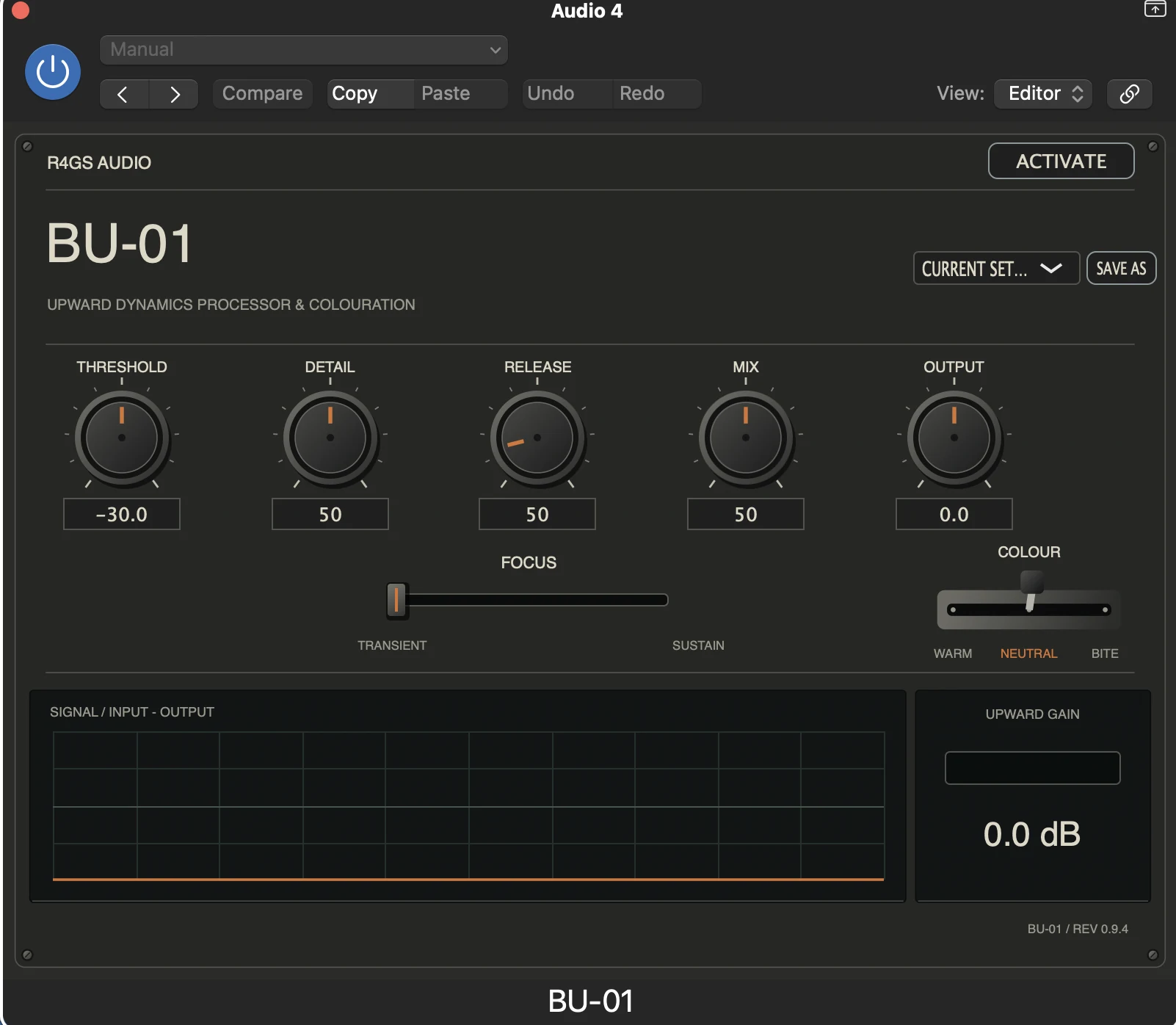
BU-01
Upward Dynamics Processor
More body and detail.
Less messing about.
Ever get a snare that has plenty of crack but not enough body? Or a clean guitar part where the attack comes through but the quieter bits disappear?
That's what I built BU-01 for. It raises the lower-level material so you can hear more of what's already there, while keeping the impact of the louder bits.
Choose Warm, Neutral or Bite, adjust it until it feels right, and carry on with the track.
Purchase and trial links will go live when the store and installer download are ready.
How to use BU-01
Start with a snare or clean guitar. You'll hear what it's doing more easily than you will on a full mix.
Five minutes to get going
- Load it on a track. Insert BU-01 as an AU or VST3 effect in your DAW.
- Start in Neutral. Hear the upward dynamics before adding any colour.
- Set Threshold. Find the level where the quieter material starts responding.
- Bring up Upward Amount. Listen for more body, sustain or low-level detail.
- Adjust Detail. Fine-tune by ear, listening particularly to what follows the initial hit.
- Match the level. Use Output Trim and compare with bypass. Louder isn't automatically better.
The aim isn't to make everything loud. It's to hear more of the useful stuff without losing the original attack.
What the controls do
- THRESHOLD
- Sets the level below which upward processing responds.
- DETAIL
- Shapes the result. Adjust it while listening to the quieter body and decay of the sound.
- UPWARD AMOUNT
- Sets how strongly the quieter material is lifted.
- OUTPUT TRIM
- Sets the final level, so you can compare fairly with the unprocessed signal.
- NEUTRAL / WARM / BITE
- Neutral is the clean starting point. Warm and Bite add different flavours of subtle saturation.
A few places to try it
Got the crack but missing the body? Listen for the drum after the initial hit. Watch out for hi-hat bleed.
Good pick attack, disappearing notes? Try lifting the quieter sustain.
Bring a little more of the drum's decay forward, without exaggerating unwanted ringing.
Help quieter phrasing stay present without crushing the louder notes.
Installation, trial and activation +
Install BU-01 using the macOS installer, then open your DAW and add it to an audio track. The installer includes AU and VST3 formats for Apple Silicon Macs.
BU-01 offers a 14-day trial. A £19.99 perpetual licence unlocks the full version using the supplied activation key, with up to three device activations.
One thing to remember: upward processing can also bring up hiss, microphone bleed and room noise. If you hear too much of that, ease the processing back.
The installer will include AU and VST3 versions for Apple Silicon Macs. After installing, open your DAW and load BU-01 on a track. Your licence key unlocks the full version.
Support contact and a short installation guide will be added before the download goes live.